
Shadowpay · shadowpay.com
Know what a Shadowpay listing is worth elsewhere
Shadowpay prices can drift noticeably from the larger markets, which is an opportunity if you can see the gap and a trap if you cannot. The CSPriceAPI extension writes the comparison price straight onto each listing, including the float value where the listing exposes one.
Shadowpay is included in the free plan — no account required.
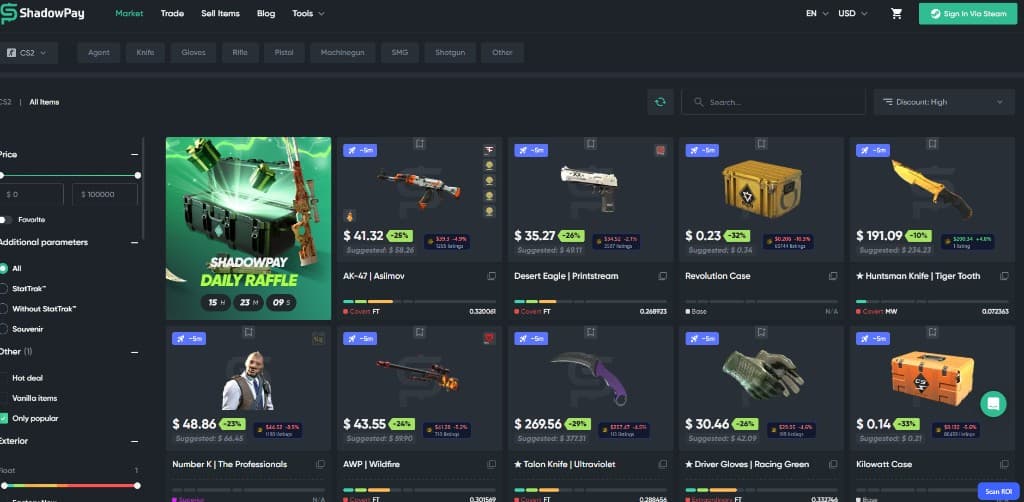
On Shadowpay
What the overlay actually does
Comparison price per listing
Every card in the grid carries the reference price and the ROI against what Shadowpay is asking.
Float taken into account
Where a listing shows a float value, Pro compares against items in the same float bracket rather than the whole exterior.
Doppler phases priced separately
Phase-specific listings get phase-specific reference prices, so a Ruby never inherits an averaged Doppler value.
Part of the free plan
No subscription needed to use Shadowpay comparisons — install and it works.
Item pages
The full picture before you buy
Open any Shadowpay listing and the panel lists every covered market with its current price and listing count, so the asking price sits next to what the rest of the market is doing. Price history, recent sales and buy orders are part of Pro.
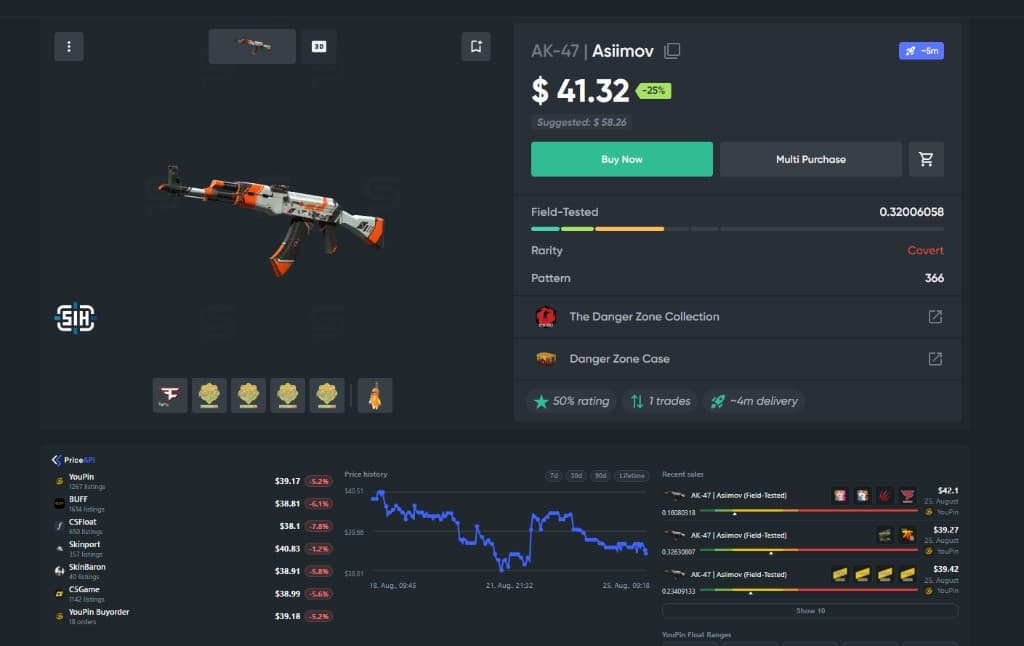
Free plan
Shadowpay works without an account
Install the extension and the badges appear on cached prices right away. Upgrade to Pro when you want live refresh, buy orders, price history, recent sales, float-ranged pricing, alerts and the five Pro marketplaces.
FAQ
Shadowpay questions
Do I need Pro for Shadowpay?
No. Shadowpay is one of the free marketplaces. Pro is only required for live refresh, buy orders, price history, recent sales, float-ranged pricing and the five Pro marketplaces.
Does the overlay handle StatTrak and Souvenir items?
Yes. StatTrak, Souvenir and normal variants are treated as separate items, because they trade at completely different prices and comparing across them would be meaningless.
How do I change which market prices are compared against?
Open the extension popup and pick your reference market. The badge follows that choice, while the item panel always shows every covered market at once.
Other marketplaces
The same overlay, everywhere else you trade
See all ten supported marketplaces →


CSPriceAPI is an independent tool and is not affiliated with Shadowpay or any game publisher. Market data can be delayed or incomplete and is not financial advice.